
You might wonder why efficient PDF rewriting is important. Well, it’s all about making your life easier. It allows you to change your PDF documents without starting from scratch. No more retyping entire documents when just a few edits are needed.
Wondershare PDFelement simplifies this process, and in the following sections, we’ll delve into its features, interface, and how to harness its power for document rewriting. By the end of this review, you’ll see why PDFelement stands out as a user-friendly, reliable, and time-saving PDF rewriter. Let’s begin this journey and unlock the potential of PDFelement.
Part 1. PDFelement: Your Reliable PDF Rewriter Tool
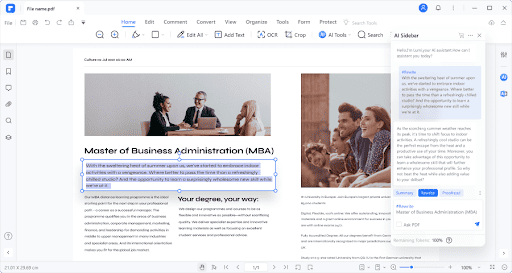
PDFelement is a user-friendly software designed to simplify working with PDF documents. Its core purpose is to make editing, reformatting, and rewriting PDFs as easy as working with a Word document.
With PDFelement’s PDF rewriter feature, you can:
- Edit text, images, and links in your PDFs without the hassle.
- Add or remove content from your documents effortlessly.
- Reorganize pages or combine multiple PDFs into one.
- Secure your PDFs with password protection and digital signatures.
What sets PDFelement apart is its AI-powered features. This means the software can understand the structure of your PDF and assist in tasks like text recognition and document organization. It can even recognize form fields and help you complete forms with ease.
No need for complex technical knowledge—PDFelement’s intuitive interface makes these tasks accessible to everyone. It’s your all-in-one solution for PDF management. Whether you’re a student needing to edit research papers or a professional handling important documents, PDFelement empowers you to do the job efficiently.
Part 2. PDF Rewriting With PDFelement
PDFelement is your go-to tool when it comes to rewriting PDF documents. It makes the process simple and accessible for anyone, whether you’re a student, a professional, or just someone looking to make changes to a PDF.
Here’s how PDFelement helps you with PDF rewriting:
Step 1: Open PDFelement and select the PDF document you want to rewrite.
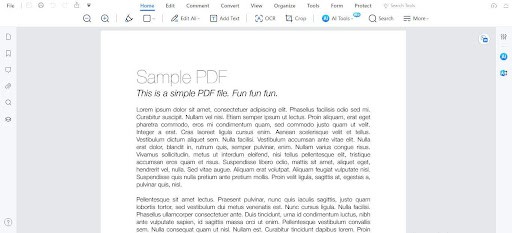
Step 2: Click the AI Sidebar on the left side of the interface. Choose the “Rewrite” option from the menu.
Step 3: In the “Content” box, type the text you want to rewrite.
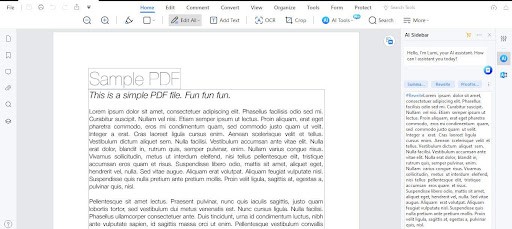
Step 4: Click the “Rewrite” button.
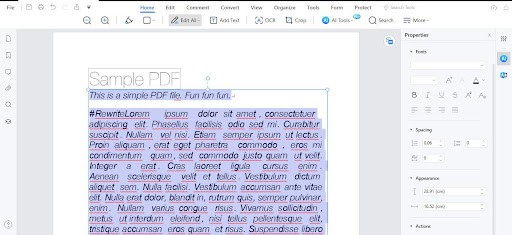
What’s fantastic about PDFelement is its integration with Lumi, a smart PDF AI robot. Lumi takes your rewriting to a whole new level. It analyzes your PDF content, understands your documents, and helps you summarize key information. It doesn’t just rewrite your text; it optimizes it for better clarity, style, and grammar.
The rewritten text can be easily copied into your files or used to replace the original text directly.
But what truly sets PDFelement apart is its simplicity and user-friendliness. You don’t need to be a tech guru to use it. It seamlessly works with other tools, making it a great choice for beginners and professionals.
So, whether you want to polish up your research paper or enhance your business documents, PDFelement with Lumi’s rewriting feature is here to make your life easier. It’s a valuable tool for everyone, offering a straightforward approach to PDF rewriting.
Exploring the AI Sidebar
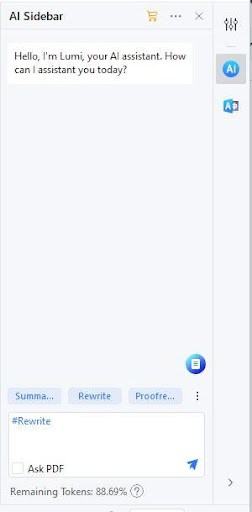
Now, let’s look at PDFelement’s layout and interface. One standout feature is the AI Sidebar located on the right side, and it’s a game-changer.
This AI Sidebar includes smart tools like Chat with PDF, Summarize, Rewrite, and Proofread. It’s designed with simplicity, ensuring that users can easily access these powerful features without fuss.
The AI Sidebar plays a significant role in PDF rewriting. When you click “Rewrite” in the AI Sidebar, the magic begins. This is where PDFelement’s AI technology takes center stage. It analyzes your content and optimizes it for clarity, style, and grammar. It’s like having a personal writing assistant right at your fingertips.
The intuitive design of the AI Sidebar ensures that even beginners can make the most of these advanced tools. You don’t need a tech expert to understand how it works. It’s all about user-friendliness and accessibility.
Part 3. Key Benefits of PDFelement as a PDF Rewriter
PDFelement stands out as an exceptional PDF rewriter, offering several key advantages.
Simplicity
- PDFelement is designed with a user-friendly interface. You don’t need to be a tech expert to use it. It’s straightforward to navigate.
Comprehensive Editing
- It empowers you to edit text, images, links, and more within your PDFs. No need to start from scratch when you want to make changes.
AI-Powered Rewriting
- The AI technology in PDFelement takes rewriting to a whole new level. It optimizes your content for clarity, style, and grammar.
Versatility
- PDFelement is versatile. It can be used by students, professionals, or anyone who works with PDFs.
Competitive Edge
- Compared to other PDF rewriting tools on the market, PDFelement’s AI-powered rewriting feature stands out. It’s not just about rewriting; it’s about enhancing your content.
Streamlined Workflow
- PDFelement simplifies your document editing process, making it more efficient. Whether you’re a student working on assignments or a business professional managing important documents, it’s a time-saving solution.
Customized Prompts
- PDFelement goes the extra mile by allowing users to customize prompts. These prompts simplify PDF editing tasks, making your work easier and more efficient.
So, if you’re looking for a tool that makes PDF rewriting accessible and efficient, PDFelement is a top choice. It combines user-friendliness with advanced AI capabilities, giving you a unique advantage in managing PDF documents.
PDFelements Pricing and Plan
PDFelement offers flexible pricing plans suitable for individuals, businesses, and education:
For Individuals
- The pricing plan for individual users starts from just $29. Additionally, there’s an economical perpetual plan available for those who prefer to pay once and use PDFelement without time restrictions.
For Businesses
- Teams can enjoy PDFelement for just $139 with the perpetual plan, allowing seamless collaboration.
For Education
- Education institutions can access PDFelement, which is $47.99, making it an affordable choice.
One remarkable feature of PDFelement is its free trial, which includes an AI feature. Users can explore its AI capabilities before committing. During the trial, you can utilize 2 million AI tokens for free.
Should you decide to continue using the AI feature after the trial, it’s available at just $9.9 per month, including 2 million AI tokens monthly.
This flexible pricing structure caters to various needs, whether you’re a single user, part of a team, or in the education sector. PDFelement ensures that you have access to the tools you require at a reasonable cost.
Part 4. The Pros and Cons of PDFelement
In PDF rewriting, PDFelement is a user-friendly tool that simplifies the process. Here’s a quick look at its pros and cons:
Pros
- PDFelement makes rewriting PDFs a breeze, thanks to its straightforward interface.
- The AI features optimize your content for style, clarity, and grammar, improving the quality of your rewritten text.
- Custom prompts make PDF editing a smoother and more efficient experience.
- PDFelement offers a range of pricing plans suitable for individuals, businesses, and education, making it accessible to various users.
Cons
- Some features, especially AI-powered ones, require an internet connection.
PDFelement’s intuitive interface and AI capabilities offer a significant advantage in PDF rewriting. It’s a practical choice for those looking to enhance their document editing experience.
Conclusion
PDFelement offers a user-friendly approach to PDF rewriting. With its AI-powered features, it simplifies text edits and enhances the quality of your documents. Custom prompts, accessible pricing, and a straightforward interface make it a valuable tool for various users. While it might take some time to learn, the benefits of PDFelement’s rewriting capabilities are well worth it.