The internet has simplified our lives beyond measure. Things that require physical labor are increasingly being taken over by automation. In these times of lockdowns and pandemic panics, this reliance on technology is good. And one sector which has completely outdone itself is the e-shopping industry. Though the charge is ked by big names like Amazon and eBay, there are plenty of companies out there who are making waves of their own.
AliExpress is among the leaders in the field of e-commerce and has been for some time. They’ve inspired many innovations like the Image Search by Alitools extension, which can be used to search for goods via images. That is the topic of this article, and we will show you how you can use programs and extensions like that to do your shopping with a few clicks simply.
Using Image Search
So, while scrolling around the internet, you found a picture of a product that’s just right for you. Like a normal person, you want to search for it on AliExpress. But do you describe it? The search bar isn’t built for long-winded descriptions. It would be so much simpler if you could search by image. Well, you can do that, which is pretty cool!
In this section, we list out what you can do to search for products on the AliExpress app by image.
Upload Image
Go to the AliExpress App on your smartphone or tablet to begin shopping. The image can be uploaded from your local storage by clicking the camera icon in the search box. AliExpress will then display a list of visually similar products to the one you just uploaded.
Use the Filters
If you don’t use filters, AliExpress will scour all kinds of goods it has, and that will waste time you don’t have. Instead of doing this, you should narrow down the results by selecting a category such as Tops, Dresses, Bottoms, and so on.
Take Advantage of Cropping or Zooming
You will see that the image you submitted will be prominently displayed at the top of the page. By clicking on it, you may narrow the search to a specific area of the photograph. Then press the Done button to see the results.
By using this wonderful little technique available in the AliExpress Mobile App, you can find the product you’re looking for fast and compare prices and sellers with ease. But what are the advantages that this brings you? Let’s take a look at that next.
Using Image Search on the Desktop
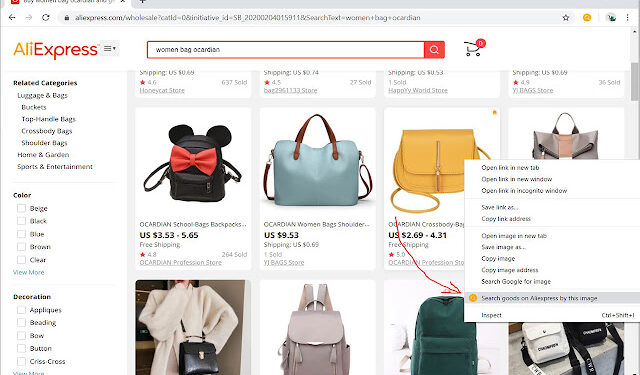
Sadly the method discussed above is native only to the AliExpress app. Those people using the website version on their computers have been out of luck. Searching by the image on the AliExpress website only leads you to Google image search results, and that’s it. However, there is a workaround.
There are multiple Chrome extensions available which, if used, allow you to use image search on the website as well effectively. All you have to do is install them, use them to image search on AliExpress, then use those results from the extension to go to the product pages on the website and make your purchases there. It has never been easier.
Why Use Image Search at All?
There are many reasons why you would want to use the image search feature rather than do it manually. Some of the most prominent ones are:
- Finding items from other sites: Have you come across a product on Amazon, eBay, or any other online retailer you like? The chances are good that any item you find on those sites is supplied by Chinese manufacturers, which means that this product can be purchased on AliExpress for a lower price than it can be purchased on Amazon or eBay. Purchase with caution!
- Sifting through different dealers: Suppose you finally find the thing you’ve been looking for. How can you be certain that this is the best deal available? On AliExpress, different vendors are offering different prices for the same goods. The price of the same product can vary significantly from one retailer to the next. Check out the thing you’re looking for by searching for it by image and looking for comparable products. Make certain that you do not overspend!
- Searching for items you don’t know the name of Due to the ambiguity of their names, there are some objects for which it is difficult to know where to look for the information. Instead of investing hours on needless and unproductive searches, searching via picture can save you time and money. Try it out for yourself and see if it works for you.
Conclusion
Image searching to find and buy products is going to be the norm in e-commerce very soon. While AliExpress is already engaging in this, they are trendsetters and will be remembered for their contributions. In the meantime, you should make the most of this feature and shop to your heart’s content!