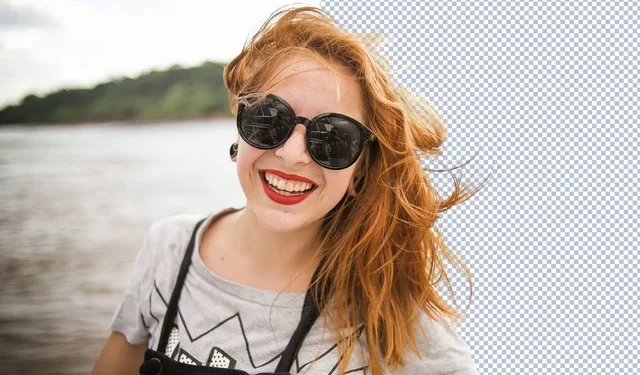
You can’t avoid the step of selecting a good-looking avatar whether you’re speaking on a forum, running your own private Facebook account, or running a YouTube channel.
A good-looking social avatar and cover image can help you get closer to the person you’re talking to, as well as promote a more engaging first impression of yourself, allowing people to learn more about you.
The Fotor online editor simply offers a set of editing functions centered on the creation of social avatars, allowing you to quickly create the ideal social avatar in a few steps.
1. Appropriate portrait and background
Begin by selecting real face photos, particularly frontal ones, to give people a positive first impression of you, such as trust.
Second, the background determines the mood of the photo, so don’t overlook this part of the editing process! A clean background, in general, means that people will pay more attention to your face or facial expressions. As a result, we must clear the cluttered background.
You can remove and replace photo backgrounds by uploading your photos to the Fotor Background Remover page.
Then go to Fotor’s pfp maker, which has a library of avatar-specific preset backgrounds in a variety of colors and patterns.
- Go to the Fotor background remover page, upload your portrait photo, and the system will automatically remove the background from your photo.
- Choose “Change Background” to replace your photo with a solid white or other color background.
2. Circle your photo
If you want to give your avatar personality, you can crop it into a circular image.
The circular frame’s cut edges allow us to better focus on the face, revealing the individual’s face and facial expressions.
In terms of the cover image, you can use any template you want to express novelty and liveliness, such as a circle, heart, five-pointed star, diamond, or even other cutting boxes.
With Fotor online circle crop feature, you can now crop your photos into irregular shapes such as rectangles, squares, stars, hearts, letters, and more, in addition to circular art. Use these tools to help you create interesting shape art.
3. Consider photo size
If your photo is too large and you’re too far away from the camera, your headshot may not show your face clearly- it’s not sharp enough.
If your photograph is too small and you’re too close to the camera, your headshot may show an incomplete display of your face, which looks strange.
So, before we upload photos to social media, we must ensure that they are the correct size for the social platform.
We can upload the avatar to the Fotor online photo editor’s social avatar size tool, which will help us crop the photo to the appropriate size of the avatar commonly used on social platforms, and see if the photo’s avatar has a suitable shooting distance.
4. Look after the color
When the colors of the avatar contrast with those of the background, they stand out. It is generally recommended to use a warm-colored background, such as orange, to increase the click-through rate.
By adjusting the contrast, brightness, saturation, sharpening, and other values, you can make the photo more visually appealing and have a strong separation from the background.
If you don’t know how to adjust them, using a photo editor like Fotor to enhance your photos with a single click simplifies color and detail adjustments.
This Fotor feature aids in photo enhancement by enhancing color, reducing blur, increasing sharpness, removing haze, and highlighting focus.
5. Resolve blemishes
You can cover up blemishes on your face, such as blemishes and wrinkles, with makeup or a Fotor portrait retouch if you want a cleaner face. A clean face and a soft smile help you feel intimacy.
6. Add some decoration
You can edit your photos by adding borders, text, stickers, emoticons, and other elements.
This personalized addition makes your avatar more engaging, which is especially useful in online social settings.
Fotor’s sticker maker allows you to edit emojis and easily place them on photos to complement your work. It has useful built-in editing tools that allow you to change the color, size, and transparency of emoji stickers, as well as rotate, flip, and duplicate them.
Sum up
To summarize, the Fotor online editor makes it simple to remove backgrounds, retouch portraits, crop out frames, add sticker text, and easily manipulate colors and sizes for making great social media avatars.